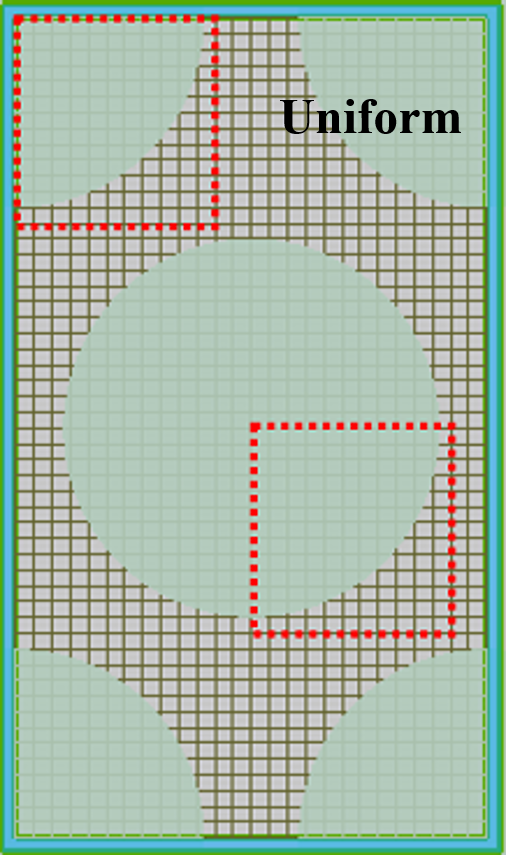

Uniform Mesh
Uniform Mesh #
This section describes uniform mesh (Uniform) settings in the solver. For an overview of mesh types, see Mesh Setting Overview.
In a uniform mesh, each mesh cell has the same size. This type is suitable for simple structures with smooth variations, enabling quick simulations and debugging. It is ideal for most standard simulation scenarios. The FDTD solver supports this mesh type; the RCWA solver's auto / custom mesh types are similar in partitioning behavior.
Mesh Definition Type #
Uniform mesh requires Mesh definition type. This option controls how the mesh is partitioned in each of the X, Y, and Z directions, and each direction can use a different definition type independently. Uniform mesh supports only the following two methods:
| Name | Description | Parameters |
|---|---|---|
| Mesh size | Sets the physical size of mesh cells in that direction. | dx (mesh size can be set separately for each direction) |
| Number of mesh cells | Sets the total number of mesh cells in that direction within the simulation region. | cells x / cells y / cells z |
When Mesh size is selected, specify the mesh size in each direction by setting dx to generate a uniform mesh. When Number of mesh cells is selected, specify the number of cells in each direction by setting cells x, cells y, and cells z to generate a uniform mesh.
Uniform mesh does not support Mesh cells per wavelength or Mesh size and mesh cells per wavelength.
For mesh refinement, see Mesh Refinement. For minimum mesh size, time step, and Mesh order, see Mesh Setting Overview.
Case Study: Photonic Crystal Mesh Settings #
Photonic crystal structures impose strict requirements on mesh symmetry at material boundaries. A sufficiently fine uniform mesh is a common approach to meet both accuracy and symmetry requirements.
The figure below shows a 2D square photonic crystal meshed with uniform cells. Setting a consistent mesh size in each direction via Mesh size or Number of mesh cells keeps the periodic structure evenly discretized.