

Electrical Material
Electrical Material #
This section describes the Electrical Material Library. Electrical materials are used only by the FDCharge solver. They are independent of the optical material library and cannot be mixed with it. For the scope of the two libraries, see Material Overview.
The electrical material library includes a set of commonly used built-in materials that can be used directly in simulation. Users can also define custom electrical materials and add them to the library with Add Material. Materials in the library fall into three types: conductor, insulator, and semiconductor.
On the Home tab, in the Materials group, click Electrical Materials to open the electrical material library.
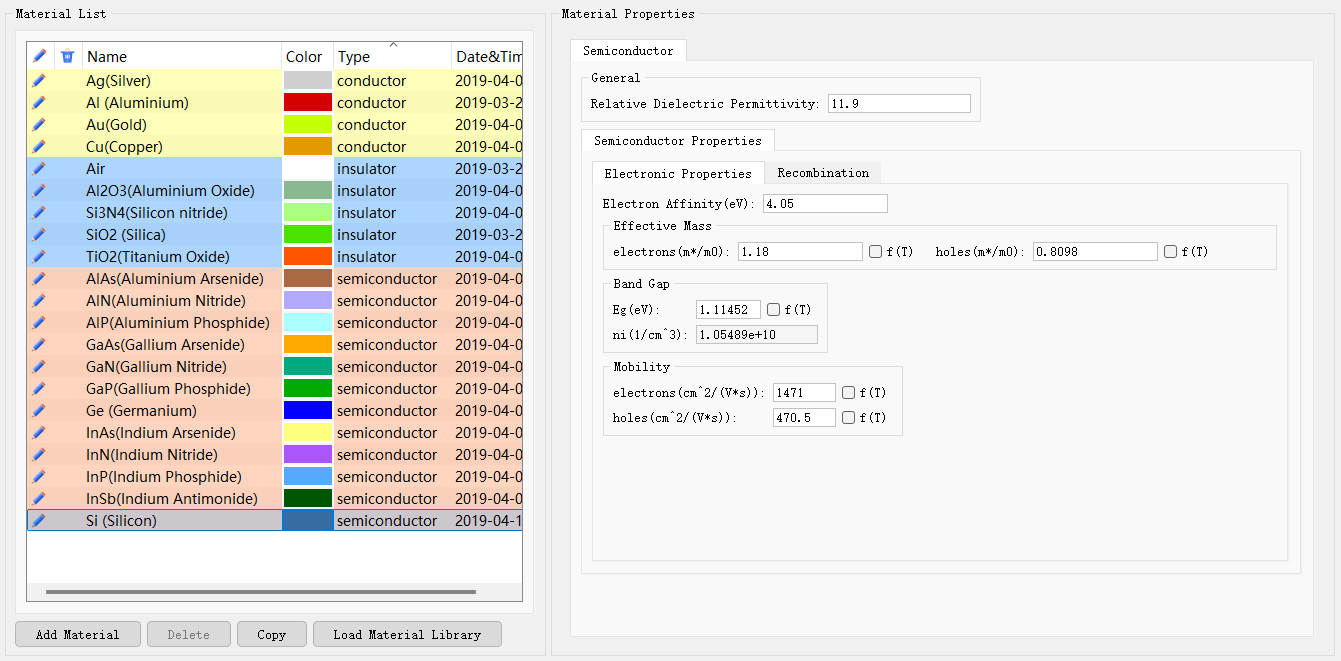
The left pane lists materials. The right pane shows Material Properties for the selected material.
Electrical Material Library #
Material List #
The left list shows electrical materials in the current library. The main columns are:
| Name | Description |
|---|---|
| Name | Material name. Built-in materials use chemical formulas or common names. Custom materials default to Untitled Material. |
| Color | Display color of the material in the structure view. |
| Type | Material type: conductor, insulator, or semiconductor. The list is grouped by type, with row colors for distinction: yellow for conductors, blue for insulators, and orange for semiconductors. |
| Date&Time | Time when the material was created or modified. |
Edit and delete icons in the list open or remove the corresponding material. Built-in materials include, for example:
- Conductors: Ag(Silver), Al(Aluminium), Au(Gold), Cu(Copper), and others;
- Insulators: Air, Al2O3, Si3N4, SiO2, TiO2, and others;
- Semiconductors: Si, Ge, GaAs, GaN, InP, and other III–V and group-IV materials.
The following buttons are available below the material list:
| Name | Description |
|---|---|
| Add Material | Add a new electrical material. Choose Add conductor, Add insulator, or Add semiconductor to create a conductor, insulator, or semiconductor. The new material appears in the corresponding type group, with the default name Untitled Material. |
| Delete | Delete the selected material. |
| Copy | Duplicate the selected material so that its parameters can be edited. |
| Load Material Library | Load an external electrical material library. |
After editing, click OK at the bottom right to save the changes and close the library.
Material Properties #
When a material is selected in the left list, the right Material Properties pane shows its parameters. The top of the pane indicates the current type (for example, Semiconductor).
General Settings #
The General group sets the relative permittivity. All three material types include this field:
| Name | Default | Description |
|---|---|---|
| Relative Dielectric Permittivity | 1 | Relative dielectric permittivity. |
Conductors and insulators are configured mainly with this field. Semiconductors additionally require Semiconductor Properties.
Conductor Materials #
Conductor materials (conductor) describe electrically conductive materials such as Ag, Al, Au, and Cu. Their parameters are set mainly as relative permittivity in General.
If a structure component has Is Electrical Contact enabled and a voltage assigned, that component is used as an electrode. For electrode settings, see the FDCharge solver.
Insulator Materials #
Insulator materials (insulator) describe dielectrics and insulating layers such as Air, SiO2, and Si3N4. Insulators do not include Semiconductor Properties.
Semiconductor Materials #
Semiconductor materials (semiconductor) describe active-region materials such as Si, Ge, and GaAs. In addition to the relative permittivity in General, set carrier and band-structure parameters in Semiconductor Properties. This group contains the Electronic Properties and Recombination tabs.
Electronic Properties #
The Electronic Properties tab sets band-structure and transport parameters. Some parameters provide an f(T) checkbox; when selected, the parameter is treated as a function of temperature.
| Name | Units | Description |
|---|---|---|
| Electron Affinity | eV | Electron affinity. |
| Effective Mass | Effective mass. electrons: electron effective mass (m∗/m0); holes: hole effective mass (m∗/m0). Both can use f(T). | |
| Band Gap | Band gap. Eg: bandgap (eV), with optional f(T); ni: intrinsic carrier concentration (1/cm3). | |
| Mobility | Carrier mobility. electrons: electron mobility; holes: hole mobility. The unit is cm2/(V⋅s). Both can use f(T). |
Recombination #
The Recombination tab sets electron–hole recombination models. After enabling an option, you can edit its parameters. Some parameters provide an f(T) checkbox; when selected, the parameter is treated as a function of temperature.
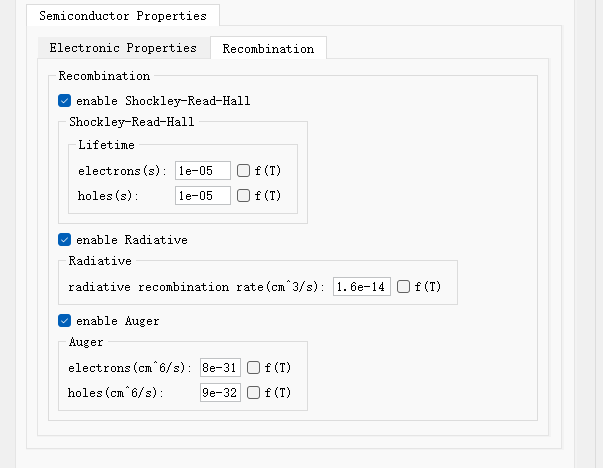
| Name | Units | Description |
|---|---|---|
| Enable Shockley-Read-Hall | Enable the Shockley-Read-Hall (SRH) recombination model. When enabled, set carrier lifetimes under Lifetime: electrons: electron lifetime (s); holes: hole lifetime (s). Both can use f(T). | |
| Enable Radiative | Enable radiative recombination. When enabled, set radiative recombination rate: radiative recombination coefficient (cm3/s), with optional f(T). | |
| Enable Auger | Enable Auger recombination. When enabled, set Auger coefficients: electrons: electron Auger coefficient (cm6/s); holes: hole Auger coefficient (cm6/s). Both can use f(T). |
Assigning Materials to Structures #
In an FDCharge simulation, right-click a structure, open Edit properties, switch to the Material tab, and select the target material from the electrical material library. The background material is also selected from the electrical material library..