

SimWorks releases SimWorks Finite Difference Solutions version 3.0.0
Dear users:
Thank you all for your attention and support to the SimWorks software. To further optimize the user experience and enhance the simulation quality, this software has been updated to version 3.0.0. The key update contents this time are:
Support for Topology-Based Inverse Design Optimization
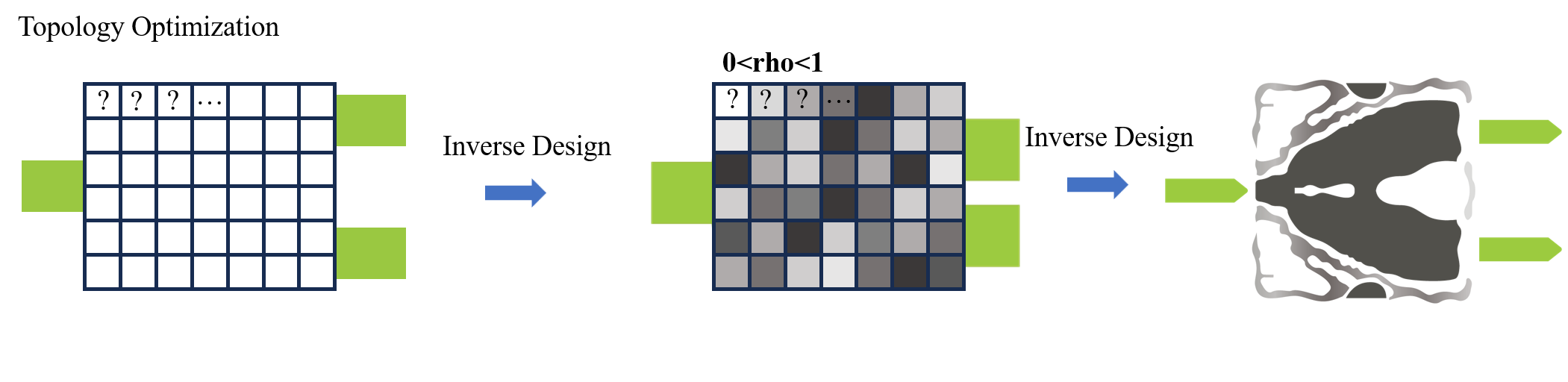
Inverse design now supports a more flexible topology optimization method. It liberates users from dependence on predefined geometries. By simply specifying a design region and available materials, the algorithm automatically explores the optimal material distribution within that space, ultimately generating high-performance designs with structures that may far exceed traditional expectations.
The core concept involves discretizing each FDTD grid cell within the design region into a design parameter representing a material. Based on the normalized grayscale values of these parameters, the topology optimizer is initiated, yielding an optimal design that combines high performance with intricate topology. This provides a powerful tool for developing a new generation of ultra-compact photonic devices, efficient optical sensors, and more.
Support for MATLAB API Calls
The software provides MATLAB API functionality, allowing users to deeply interact with the SimWorks Finite Difference Solutions simulation software by writing MATLAB scripts or programs.
Through this interface, users can:
- Directly control the simulation software: perform operations such as launching the software, setting parameters, and running simulations.
- Achieve bidirectional data exchange: transmit variables, matrices, and complex data structures from the MATLAB workspace to SimWorks, and also extract simulation results and data from the software.
- Build automated workflows: integrate the simulation setup, execution, and post-processing flow within the MATLAB environment to achieve task batching, parameter sweeps, and design optimization.
Leveraging this API, users can seamlessly combine the powerful physical field simulation capabilities of SimWorks with MATLAB's data analysis and visualization functions. This not only significantly improves the efficiency of simulation post-processing but also offers high flexibility for realizing more complex modeling and building customized simulation platforms.
The following code sets up the API runtime environment for SimWorks FD Solutions in MATLAB.
% Setting up the MATLAB API environment for SimWorks Finite Difference Solutions
% Set the software file path (the directory containing `fd_solution.exe`)
bin_dir = 'C:\Program Files\SimWorks\SimWorks FD Solutions\bin';
if ~contains(getenv('PATH'), bin_dir)
    setenv('PATH', [getenv('PATH') ';' bin_dir]);
end
% Set the MATLAB API interface file path (the directory containing `.mexw64` files)
mex_dir = 'C:\Program Files\SimWorks\SimWorks FD Solutions\api\matlab';

if ~contains(path, mex_dir)
    path(path, mex_dir);
end
New Planar Solid Structure
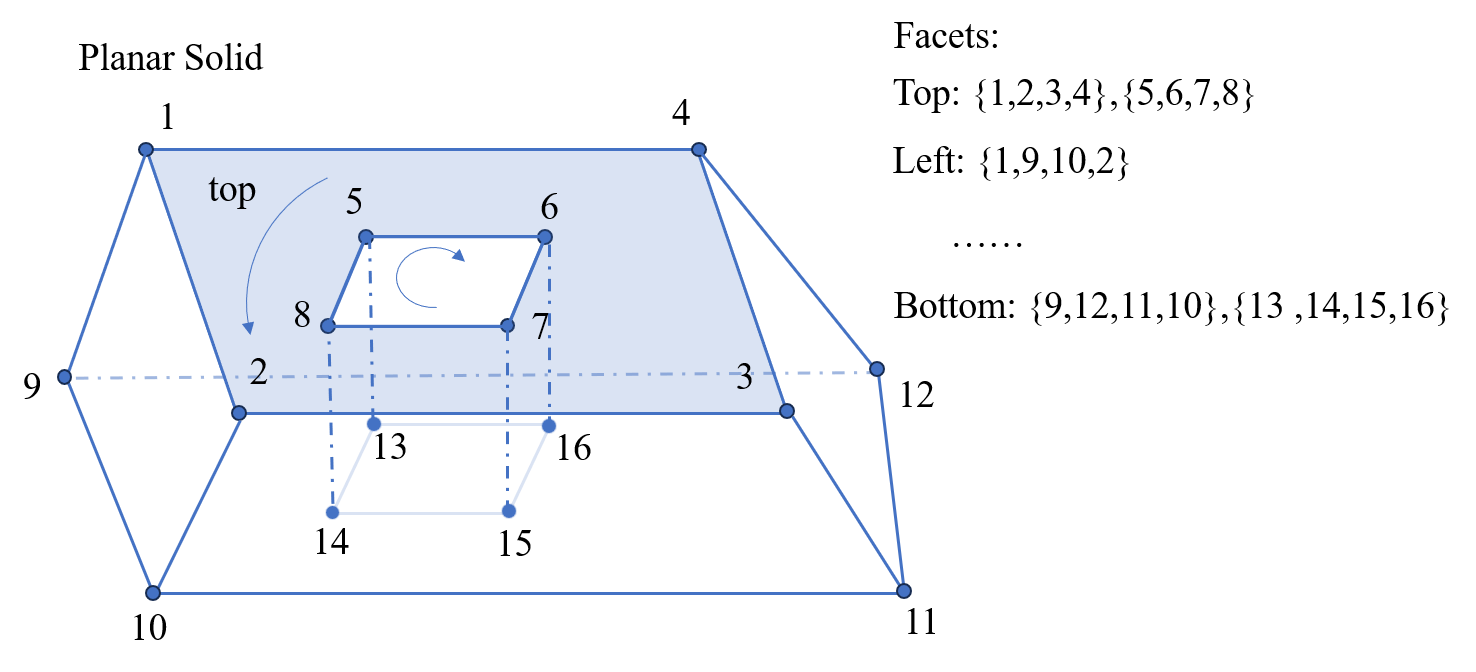
Support is added for the Planar Solid structure, which resembles a polygon structure extruded into three-dimensional space. Users can directly construct solid models of arbitrary shapes by defining vertices and facets. This fundamentally simplifies the creation process for complex 3D components. Users no longer need to manually combine multiple basic structures (like blocks and cylinders) and tediously set the mesh order for their overlapping parts, thereby significantly improving modeling efficiency and accuracy.
Using this structure requires defining two key variables:
- vertices: A vertex coordinate matrix, where each row represents the (x, y, z) coordinates of a vertex.
- facets: Defines which vertices enclose each facet. This variable can be a matrix or a cell array. The order of vertex indices should follow the right-hand rule to determine the front and back sides of a facet (as shown in the figure below, the path defined by vertices represents the front side, while the path represents the back side).
Complete update content see - Release Notes, Welcome users to download to use - Customer Downloads !
Shandong Guangfang Software Company has been deeply engaged in the development of optical simulation software for many years, committed to providing more professional and efficient simulation services. Once again, we thank you all for your attention and look forward to your feedback and valuable suggestions!