

/
顶层元件
顶层元件 #
顶层元件是原理图层次中的最顶层容器,包含当前设计中的全部元件,并承载可被其它元件继承的全局仿真设置,如比特率、时间窗、采样率与环境温度。它同时具备复合元件的层次能力,可作为最顶层结构组织端口与脚本化参数,仿真前的校验选项亦在此设置。
原理图 #
用户可在元素库中双击元件,将元件添加至顶层元件原理图中并进行连线。按住鼠标中键可移动顶层元件原理图。
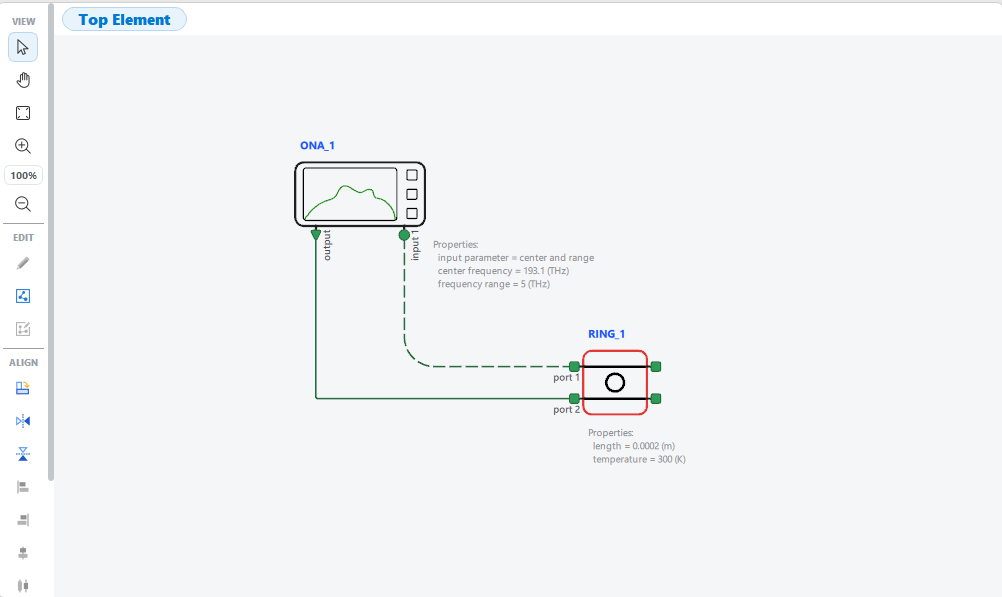
左侧为原理图的编辑工具,包括以下三类:
- VIEW
| Name | Description |
|---|---|
| Select | 将鼠标切换为选择模式,用于在原理图中点选或框选元件。 |
| Pan | 切换为平移模式,按住鼠标拖动可移动原理图画布,不改变缩放比例。 |
| Fit All | 自动缩放视图,使原理图中的所有元件恰好完整显示在当前窗口内。 |
| Zoom In | 放大视图,增大画布显示比例。 |
| Zoom Out | 缩小视图,减小画布显示比例。 |
- EDIT
| Name | Description |
|---|---|
| Edit | 打开所选元件的编辑窗口,可修改其名称、端口、脚本及属性等配置。 |
| Create Compound | 将当前选中的多个元件合并为一个复合元件,便于层次化组织电路。 |
| Expand | 展开复合元件,显示其内部子元件与内部连接关系,以便查看或修改内部结构。 |
- ALIGN
| Name | Description |
|---|---|
| Rotate | 将选中元件绕其中心旋转90°。 |
| Horizontal Flip | 将选中元件沿垂直轴水平翻转。 |
| Vertical Flip | 将选中元件沿水平轴垂直翻转。 |
| Align Left | 将选中的多个元件按最左侧元件的左边缘对齐。 |
| Align Right | 将选中的多个元件按最右侧元件的右边缘对齐。 |
| Align H-Center | 将选中的多个元件按水平中心线对齐。 |
| H-Distribute | 在水平方向上等间距分布选中的多个元件。 |
| Align Top | 将选中的多个元件按最上方元件的上边缘对齐。 |
| Align Bottom | 将选中的多个元件按最下方元件的下边缘对齐。 |
| Align V-Center | 将选中的多个元件按垂直中心线对齐。 |
| V-Distribute | 在垂直方向上等间距分布选中的多个元件。 |
属性的继承与注释 #
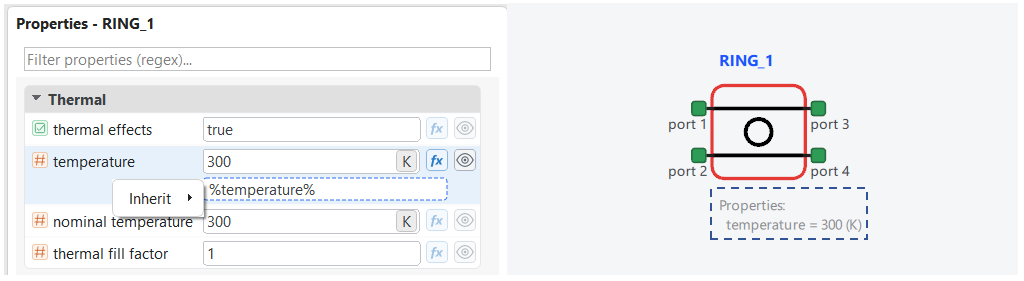
顶层元件定义了一组全局属性,其下属所有元件均可继承这些属性,也可根据需求断开继承关系。默认情况下,所有适用元件均自动继承顶层元件的全局属性。要选择要继承的属性,请右键单击该属性,单击"Inherit:",然后从列表中选择要继承的属性。也可通过输入元件的属性表达式实现属性的继承,详细使用见属性表达式。
点击视图(属性视图、结果视图和端口视图)中的Annotate按钮可将对应信息注释至顶层元件原理图中。
端口 #
没有固定端口。顶层设计对外的端口由内部的 Relay 决定。
属性 #
General #
用于标识与管理元件本身,包括名称、注释、启用状态与显示方式。该组属性仅影响原理图呈现,不改变器件行为。
| Name | Description | Default value | Default unit | Range |
|---|---|---|---|---|
| name | 元件的名称 | TOP_1 | - | - |
| annotate | 是否显示注释 | true | - | [true, false] |
| enabled | 是否启用该元件 | true | - | [true, false] |
| type | 元件的唯一类型标识 | Top Element | - | - |
| description | 元件的简要说明 | The top-most element in the hierarchy of compound elements | - | - |
| prefix | 元件名称的前缀 | TOP | - | - |
| local path | 元件的本地路径或工作文件夹 | - | - | - |
Simulation #
设置整份设计的全局仿真参数,其它元件默认继承这些取值。
| Name | Description | Default value | Default unit | Range |
|---|---|---|---|---|
| bitrate | 比特率 | 2.5e10 | bits/s | (0, +∞) |
| simulation input | 仿真输入 | time window | - | [time window, sequence length, sample rate] |
| samples per bit | 每比特采样数 | 64 | - | [1, 1e9],2 的幂 |
| sequence length | 序列长度 | 128 | - | [1, 1e9],2 的幂 |
| time window | 时间窗 | 5.12e-9 | s | (0, +∞) |
| sample rate | 采样率 | 1.6e12 | Hz | [0, +∞) |
| number of samples | 采样点数 | 8192 | - | [1, 1e100] |
Simulation / Signal Mode #
控制仿真的信号生成方式。
| Name | Description | Default value | Default unit | Range |
|---|---|---|---|---|
| output signal mode | 输出信号模式 | sample | - | [sample, block] |
| number of output signals | 输出信号数量 | 1 | - | [1, +∞) |
Simulation / Signal Mode / Sample #
设置采样模式下的光载频范围。
| Name | Description | Default value | Default unit | Range |
|---|---|---|---|---|
| sample mode frequency band | 采样模式频带 | automatic | - | [automatic, single] |
| sample mode center frequency | 采样模式中心频率 | 193.1 | THz | (0, +∞) |
Thermal #
设置整份设计的环境温度,其它随温度变化的属性默认继承该值。
| Name | Description | Default value | Default unit | Range |
|---|---|---|---|---|
| temperature | 温度 | 300 | K | (-∞, +∞) |
Enhanced #
控制监视数据的保存方式与仿真输出格式。
| Name | Description | Default value | Default unit | Range |
|---|---|---|---|---|
| monitor data | 监视数据选项 | save to disk | - | [save to disk, save to memory] |
| monitor buffer size | 监视缓冲大小 | 64 | - | [2, +∞) |
| animate simulation | 是否在仿真过程中播放动画 | false | - | [true, false] |
| animation delay | 动画帧之间的延时 | 0.5 | s | [0, +∞) |
| simulation output | 仿真输出 | disable | - | [disable, csv, psf] |
Numerical #
设置并行计算策略,决定仿真使用的线程数。
| Name | Description | Default value | Default unit | Range |
|---|---|---|---|---|
| multithreading | 多线程策略 | user defined | - | [automatic, user defined] |
| number of threads | 自定义计算线程数 | 4 | - | [1, +∞) |
Numerical / Digital Filter #
设置时域仿真数字滤波器的全局抽头上限与固定延迟。
| Name | Description | Default value | Default unit | Range |
|---|---|---|---|---|
| maximum number of fir taps | FIR 抽头数上限 | 4096 | - | [1, +∞) |
| filter delay | 滤波器延迟 | 0 | s | [0, +∞) |
Script #
控制原理图脚本的运行时机。
| Name | Description | Default value | Default unit | Range |
|---|---|---|---|---|
| run setup script | 是否运行 Setup 脚本 | automatic | - | [automatic, always] |
Design Kit #
记录设计套件与版本信息,用于标识元件来源与版本。
| Name | Description | Default value | Default unit | Range |
|---|---|---|---|---|
| version | 版本号 | - | - | - |
| internal electrical equivalent | 是否使用内部电学等效模型 | true | - | [true, false] |
Design Kit / Header #
记录设计套件的头信息,供脚本与工艺套件识别。
| Name | Description | Default value | Default unit | Range |
|---|---|---|---|---|
| component id | 元件标识 ID | - | - | - |
| mcs filename | 工艺设计套件名称及其参数的列表文件 | - | - | - |
| mcs | 工艺设计套件的名称 | - | - | - |
Validation #
设置仿真前的检查项,用于提前发现连接、采样率与死锁等问题。
| Name | Description | Default value | Default unit | Range |
|---|---|---|---|---|
| check internal monitors | 是否检查复合元件内部监视器 | true | - | [true, false] |
| check disconnected ports | 是否检查未连接端口与 Relay 连接 | false | - | [true, false] |
| check analyzer sensitivity | 是否检查分析仪灵敏度 | false | - | [true, false] |
| check input sample rate | 是否检查各输入端口采样率是否一致 | true | - | [true, false] |
| source connections | 源连接检查策略 | resolve | - | [resolve, test, ignore] |
| deadlock resolution | 仿真死锁处理策略 | prevent | - | [ignore, prevent] |
| delay insertion | 自动插入延迟的端口范围 | bidirectional ports | - | [output ports, bidirectional ports] |
结果 #
每次仿真结束后,Result 面板中会写入本次计算的总耗时:

| Name | Description |
|---|---|
| total elapsed time | 本次仿真结束后的总耗时,单位为秒。 |