

基础数学
This section describes the elementary math functions.
abs #
Description
Computes the absolute value of real number or the modulus of complex number.
Used in FDTD and FDE.
Syntax
| Code | Function |
|---|---|
m = abs(num); |
Computes the absolute value of real number or the modulus of complex number. |
Example
z = 3 + 4i;

m = abs(z)
Result:
m =
             5
See also
real
angle #
Description
Returns the angle of a complex number or each complex number of matrix in radians.
Used in FDTD and FDE.
Syntax
| Code | Function |
|---|---|
angle(comp_num); |
Returns the angle of the complex number comp_num in radians. |
angle(comp_matrix); |
Returns the angle of each complex number in matrix comp_matrix in radians. |
See also
real
real #
Description
Returns the real part of the input.
Used in FDTD and FDE.
Syntax
| Code | Function |
|---|---|
out = real(A); |
Returns the real part of the input. If the argument is a matrix, then the real operation is performed on an element-by-element basis. |
Example
X = [1+2j, 1+3j; 2, 1-2j ]

out = real(X)
Result:
X =
              1 +           2i              1 +           3i
              2 +           0i              1 -           2i
out =
             1             1
             2             1
See also
conj, imag
imag #
Description
Returns the imaginary part of the input.
Used in FDTD and FDE.
Syntax
| Code | Function |
|---|---|
out = imag(A); |
Returns the imaginary part of the input. If the argument is a matrix then the imag operation is performed on an element-by-element basis. |
Example
X = [1+2j, 1+3j; 2, 1-2j ]

out = imag(X)
Result:
X =
              1 +           2i              1 +           3i
              2 +           0i              1 -           2i
out =
             2             3
             0            -2
See also
real
conj #
Description
Complex conjugate.
Used in FDTD and FDE.
Syntax
| Code | Function |
|---|---|
out = conj ( A ); |
Returns the complex conjugate of its input argument. For matrix argument, the complex conjugate operation is performed element by element. |
Example
b = [1+2j, 3+4j; 5, 6-7j]

out = conj(b)
Result:
b =
              1 +           2i              3 +           4i
              5 +           0i              6 -           7i
out =
              1 -           2i              3 -           4i
              5 +          -0i              6 +           7i
See also
imag
pow #
Description
Calculates the power of a specified number.
Used in FDTD and FDE.
Syntax
| Code | Function |
|---|---|
pow(base, exponent); |
Calculates the power of the input number base. The second input number is exponent. |
Example
pow(2,3)
Result:
val =
             8
See also
sqrt
dot #
Description
Calculates the dot product of the input vectors or matrices.
Used in FDTD and FDE.
Syntax
| Code | Function |
|---|---|
out = dot(A, B) |
A, B must be 3 * n matrices. Calculates dot product between column vector A(:,i) and the corresponding column vector B(:,i). |
Example
A = [1, 0; 0, 1; 0 , 0]
B = [1, 0; 0, 2; 0 , 0]

dot(A, B)
Result:
A =
             1             0
             0             1
             0             0
B =
             1             0
             0             2
             0             0
val =
             1             2
See also
cross
cross #
Description
Computes the vector cross product.
Used in FDTD and FDE.
Syntax
| Code | Function |
|---|---|
out = cross(A, B); |
Computes the vector cross product of vector A and B(two 3-by-1 matrices). If A and B are matrices, they must be 3 * n matrices, the cross function will calculate the cross product between A(:, m) and B(:, m). |
See also
dot
cumprod #
Description
Computes the running or cumulative product of the input.
Used in FDTD and FDE.
Syntax
| Code | Function |
|---|---|
out = cumprod ( A ); |
Computes the running or cumulative product of the input A. If the input is a rectangular matrix, then the cumulative product operation is performed over each column of the matrix respectively. |
Example
a = 1:4
b = cumprod (a)
Result:
a =
             1             2             3             4
b =
             1             2             6            24
See also
cumsum
cumsum #
Description
Cumulative sum.
Used in FDTD and FDE.
Syntax
| Code | Function |
|---|---|
out = cumsum ( A ); |
Computes the running or cumulative sum of a vector or matrix. The return object is a matrix the same size as input A. If A is a rectangular matrix, then the cumulative sum operation is performed over each column of the matrix respectively. |
Example
b = [1,2,3;4,5,6;7,8,9]
b_cusum = cumsum(b)
Result:
b =
             1             2             3
             4             5             6
             7             8             9
b_cusum =
             1             2             3
             5             7             9
            12            15            18
See also
cumprod, prod, sum
all #
Description
Checks if all elements are non-zero.
Used in FDTD and FDE.
Syntax
| Code | Function |
|---|---|
out = all( A); |
When A is a vector (row or column), returns 1 if all elements of A are non-zeros, otherwise returns 0. When A is a matrix, all function will operate on each column of A respectively, returning a row-vector of ones and zeros. |
Example
A = [1, 2, 3; 4, 0, 5];

out = all(A)
Result:
out =
             1             0             1
See also
any
any #
Description
Checks if any elements are non-zero.
Used in FDTD and FDE.
Syntax
| Code | Function |
|---|---|
out = any(A); |
When A is a vector (row or column), returns 0 if any element of A is zero, otherwise returns 1. When A is a matrix, any function will operate on each column of A respectively, returning a row-vector of ones and zeros. |
Example
A = [1, 2, 0; 4, 0, 0];

out = any(A)
Result:
out =
             1             1             0
See also
all
iscolumn #
Description
Determines whether a vector is a column vector.
Used in FDTD and FDE.
Syntax
| Code | Function |
|---|---|
out = iscolumn(a); |
Determines whether a vector is a column vector. If the input a is a column vector, returns 1. |
See also
isrow
isrow #
Description
Determines whether a vector is a row vector.
Used in FDTD and FDE.
Syntax
| Code | Function |
|---|---|
out = isrow(a); |
Determines whether a vector is a row vector. If the input a is a row vector, returns 1. |
See also
iscolumn
ceil #
Description
Returns the smallest integer not less than the input argument.
Used in FDTD and FDE.
Syntax
| Code | Function |
|---|---|
out = ceil ( a ); |
Returns the smallest integer not less than the input argument. If the argument is a matrix, then the ceil operation is performed on an element-by-element basis. |
Example
b = rand(2, 3).*10

out = ceil( b )
Result:
b =
     7.4853313     6.4248842   0.889701694
    3.85106683    7.78148055    7.96419024
out =
             8             7             1
             4             8             8
fix #
Description
Rounds each element of matrix X to the nearest integer towards zero.
Used in FDTD and FDE.
Syntax
| Code | Function |
|---|---|
out = fix(X); |
Rounds each element of matrix X to the nearest integer towards zero. |
Example
X = [-1.5, 2.3; 1.5 ,0]

out = fix(X)
Result:
X =
          -1.5           2.3
           1.5             0
out =
            -1             2
             1             0
See also
ceil, floor, round, sign, abs
floor #
Description
Returns the largest integer not greater than the argument. If the argument is a matrix, then the floor operation is performed on an element-by-element basis.
Used in FDTD and FDE.
Syntax
| Code | Function |
|---|---|
out = floor(X); |
Returns the largest integer not greater than the argument. If the argument is a matrix, then the floor operation is performed on an element-by-element basis. |
Example
X = [-1.5, 2.3; 1.5 ,0]

out = floor(X)
Result:
X =
          -1.5           2.3
           1.5             0
out =
            -2             2
             1             0
See also
ceil
round #
Description
Returns the nearest integer value to its floating point input X as a double-precision floating point number.
Used in FDTD and FDE.
Syntax
| Code | Function |
|---|---|
out = round(X); |
Returns the nearest integer value to its floating point input X as a double-precision floating point number. The returned value is rounded according to the currently set machine rounding mode. If round-to-nearest is set and the difference between the function argument and the rounded result is exactly 0.5, then the result will be rounded to the nearest even integer. |
Example
A = rand(2, 3).*10

B = round(A)
Result:
A =
    2.07460493    9.58588481    5.36877036
    0.66318281    7.68718481    6.99025512
B =
             2            10             5
             1             8             7
See also
floor, ceil
int #
Description
Converts the input to integer.
Used in FDTD and FDE.
Syntax
| Code | Function |
|---|---|
out = int(X); |
Converts the input to integer. If the argument is a matrix then the int operation is performed on an element-by-element basis. |
Example
b = 3.14159;
b_int = int(b)
Result :
b_int =
             3
See also
ceil, floor
max #
Description
Returns the maximum value(s).
Used in FDTD and FDE.
Syntax
| Code | Function |
|---|---|
out = max(A); |
Returns the maximum value(s) contained in the matrix. If the input A is a vector, returns the maximum value of it. If the input A is a matrix, returns a row-vector containing the maximum values from each column of A. |
out = max(A, B); |
Returns a matrix the same size as matrix A. The matrices A and B must be the same size. The output matrix out contains the larger of the corresponding elements in A and B. |
Note :
When matrix elements are complex the absolute value is used for comparison purposes.
Example
b = [1, 3, -1; 3, 0.5, 6]
out = max(b)
Result:
b =
             1             3            -1
             3           0.5             6
out =
             3             3             6
See also
maxi, min, mini
maxi #
Description
Returns the index of the maximum value.
Used in FDTD and FDE.
Syntax
| Code | Function |
|---|---|
out = maxi( A ); |
Returns the index of the maximum value. If A is a vector, returns the index of the largest value. If A is a M * N matrix, returns a row-vector of the row indices of the largest column values of A. |
See also
max, min, mini
min #
Description
Returns the minimum value(s) contained in the matrix.
Used in FDTD and FDE.
Syntax
| Code | Function |
|---|---|
out = min(A); |
Returns the minimum value(s) contained in the matrix. If the input A is a vector, returns the smallest value of it. If the input A is a matrix, returns a row-vector containing the minimum values from each column of A. |
out = min(A, B); |
Returns a matrix the same size as matrix A. The matrices A and B must be the same size. The output matrix out contains the smaller of the corresponding elements in A and B. |
Note:
When matrix elements are complex the absolute value is used for comparison purposes.
Example
b = [1, 3, -1; 3, 0.5, 6]
out = min(b)
Result:
b =
             1             3            -1
             3           0.5             6
out =
             1           0.5            -1
See also
mini, max, maxi
mini #
Description
Returns the index of the minimum value.
Used in FDTD and FDE.
Syntax
| Code | Function |
|---|---|
out = mini( A ); |
Returns the index of the minimum value. If A is a vector, returns the index of the minimum value. If A is a M * N matrix, returns a row-vector of the row indices of the minimum column values of A. |
See also
max, maxi, min
findpeaks #
Description
Finds the peaks from the spectrum or others.
Used in FDTD and FDE.
Syntax
| Code | Function |
|---|---|
[val, ind] = findpeaks(D, num); |
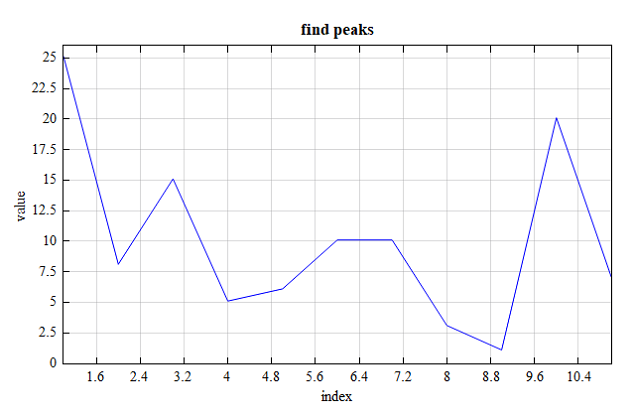
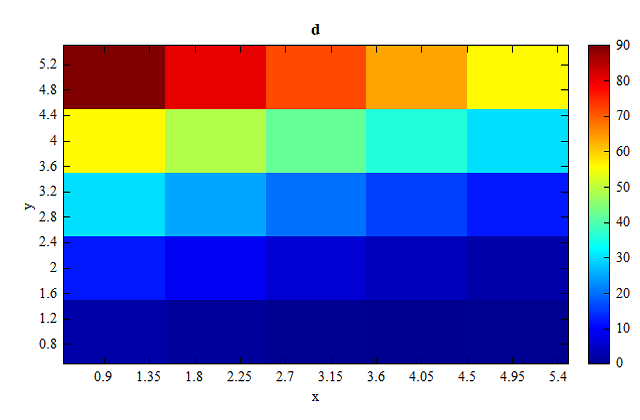
Returns the indexes of local maxima(peaks) ind and values of local maxima(peaks) val of the input vector or matrix D. The parameter num is the number of local maxima(peaks) to be returned. If the number of local maxima that can actually be found is less than the value of num , then the findpeaks function will return the local maxima that can actually be found and throw a warning. |
Example
closeall;
clearall;

# findpeaks() can find peaks of a vector
vector = [25.1,8.1,15.1,5.1,6.1,10.1,10.1,3.1,1.1,20.1,7.1];  # signal
[peaks_val,peaks_ind] = findpeaks(vector, 5);  # return a list about val and ind

figure();
plot(1:length(vector), vector,'b');
xlabel('index');
ylabel('value');
title('find peaks');

# findpeaks() also can find peaks of a matrix
x = [1, 2, 3, 4, 5];
y = [1, 2, 3, 4, 5];
d = zeros(length(x),length(y));
for (i = 1:length(x))
	for(j = 1:length(y))
		d(i,j) =(2*x(i)-0.5*y(j)).^2;
	end
end
[peaks_val2,peaks_ind2] = findpeaks(d, 5);

figure();
image(x,y,d);
xlabel('x');
ylabel('y');
Result:
> peaks_ind
peaks_ind =
            10             3             6
> peaks_val
peaks_val =
          20.1          15.1          10.1
> peaks_ind2
peaks_ind2 =
             5            10            15            20
> peaks_val2
peaks_val2 =
         90.25            81         72.25            64
The figures show the output of the example code:
vector:
matrix d:
sort #
Description
Sorts array elements.
Used in FDTD and FDE.
Syntax
| Code | Function |
|---|---|
[val,ind] = sort(A) |
If A is a vector (either row or column), then val and ind are sorted values and indices. If A is a matrix (m > 2), the sort operation will be performed on each column of A respectively, then val is the sorted columns of A, and ind is the sorted indices of A. Numerical matrices are sorted in ascending numerical value. Complex matrices are sorted by absolute value. String matrices are sorted alphabetically (using strcmp()). |
Example
  m=[2,54,78,1,34,78,99,55];
  [val,ind] = sort(m);
Result:
 val =
             1             2            34            54            55            78            78            99

ind =
             4             1             5             2             8             6             3             7
sort2 #
Description
Rearranges matrix according to the given index.
Used in FDTD and FDE.
Syntax
| Code | Function |
|---|---|
[fxy2,xs,ys] = sort2(fyx, y, x); |
Rearranges matrix according to the given index. |
Example
aa = [1,2,3;4,5,6;3,1,4]

sort2( aa, [1,2,3],[1,3,2] )
Result:
aa =
             1             2             3
             4             5             6
             3             1             4
val =
             1             2             3
             3             1             4
             4             5             6
See also
sort
flip #
Description
Reverses the order of elements in designated vector or matrix.
Used in FDTD and FDE.
Syntax
| Code | Function |
|---|---|
flip(V) |
Reverses the order of elements in designated vector V. If the input V is a matrix, flip operation will be performed on each column of matrix V respectively. |
Example
V = [1, 3, 5, 7, 3]

R = flip(V)
Result:
V =
             1             3             5             7             3
R =
             3             7             5             3             1
See also
sort, sort2
inf #
Description
Returns a scalar whose value is infinity, according to IEEE-754. Unlike NaN, inf == inf should return TRUE (1).
Used in FDTD and FDE.
Syntax
| Code | Function |
|---|---|
out = inf; |
Returns a scalar whose value is infinity. |
Example
inf_1 = inf;
inf_2 = inf;

inf_1 == inf_2
Result:
val =
             1
See also
nan
nan #
Description
Returns a NaN (Not a Number) according to IEEE-754. One way to determine if a variable contains a NaN is to test it against itself. NaN == NaN should always return FALSE (0).
Used in FDTD and FDE.
Syntax
| Code | Function |
|---|---|
out = nan; |
Returns a NaN (Not a Number). |
Example
out = nan;
out_2 = nan;

out == out_2
Result:
val =
             0
See also
inf
mod #
Description
Returns the floating point remainder of the division of A by B.
Used in FDTD and FDE.
mod(A, B) returns A if B is zero or A/B would overflow, otherwise returns the number F with the same sign as B, such that A = k * B + F for some integer k, and |F| < |B|.
When the arguments for mod are two matrices, then an element-by-element mod operation is performed. mod works on complex number also.
mod(x,y) is equivalent to:
mod(x,y)=x−y∗floor(x/y)
The mod function follows the convention that mod(x,0) returns x.
Syntax
| Code | Function |
|---|---|
out = mod(A, B); |
Returns the floating point remainder of the division of A by B. |
Example
x = 10;
y = 3;

z = mod(x, y)
Result:
z =
             1
See also
rem
prod #
Description
Computes the product of the elements of A (if A is a vector). If A is a matrix, returns a row vector containing the products of each column.
Used in FDTD and FDE.
Syntax
| Code | Function |
|---|---|
out = prod ( A ); |
Computes the product of the elements of A (if A is a vector). If A is a matrix, returns a row vector containing the products of each column. |
Example
A = [1, 2; 3, 6]

b = prod(A)
Result:
A =
             1             2
             3             6
b =
             3            12
See also
mod, cumprod
rem #
Description
Calculates the remainder of A / B.
Used in FDTD and FDE.
Note:
The mod( A, B ) is equivalent to rem( A, B). mod is a built-in function, and is much faster when operating on matrices. rem is provided mostly for MATLAB compatibility.
Syntax
| Code | Function |
|---|---|
out = rem(A, B); |
Calculates the remainder of A / B. |
Example
x = 10;
y = 3;

z = rem(x, y)
Result:
z =
             1
See also
mod
sign #
Description
Returns the sign of A. For a complex scalar, sign returns: A ./ abs (A) .
The sign function performs its operation on real and complex matrices in an element-by-element fashion.
Used in FDTD and FDE.
Syntax
| Code | Function |
|---|---|
out = sign ( A ); |
Returns the sign of A. |
Example
z = 3 + 4j;

out = sign(z)
Result:
out =
            0.6 +         0.8i
acos #
Description
Computes the arc-cosine.
Used in FDTD and FDE.
The trigonometric functions are scalar functions. The return value is the result of the trigonometric operation performed on the input, element by element.
All the trigonometric functions use the C language math library functions, so details about the ranges and error conditions can be found by examining the appropriate manual pages on your system.
Syntax
| Code | Function |
|---|---|
out = acos( A ); |
Computes the arc-cosine. |
Example
out = acos(0.5)
Result:
out =
    1.04719755
See also
asin
asin #
Description
Computes the arc-sin.
Used in FDTD and FDE.
The trigonometric functions use the C language math library functions, so details about the ranges and error conditions can be found by examining the appropriate manual pages on your system.
Syntax
| Code | Function |
|---|---|
out = asin(A); |
Computes the arc-sin. |
Example
out = asin(0.5)
Result:
out =
   0.523598776
See also
acos
atan #
Description
Computes the arc-tangent.
Used in FDTD and FDE.
The trigonometric functions use the C language math library functions, so details about the ranges and error conditions can be found by examining the appropriate manual pages on your system.
Syntax
| Code | Function |
|---|---|
out = atan( A ); |
Computes the arc-tangent. |
Example
out = atan(0.5)
Result:
out =
   0.463647609
See also
asin
atan2 #
Description
Computes the arc-tangent.
Used in FDTD and FDE.
The atan2 function takes two arguments, which are the y, and x values used to form the tangent. All the trigonometric functions use the C language math library functions, so details about the ranges and error conditions can be found by examining the appropriate manual pages on your system.
atan2 does not operate on complex arguments.
Syntax
| Code | Function |
|---|---|
out = atan2( y , x ); |
Computes the arc-tangent of y/x. |
Example
y = 1;
x = 2;
at = atan2(y, x)
Result:
at =
   0.463647609
See also
atan
cos #
Description
Computes the cosine.
Used in FDTD and FDE.
The trigonometric functions are scalar functions. The return value is the result of the trigonometric operation performed on the input, element by element.
All the trigonometric functions use the C language math library functions, so details about the ranges and error conditions can be found by examining the appropriate manual pages on your system.
Syntax
| Code | Function |
|---|---|
out = cos( A ); |
Computes the cosine. |
See also
sin
sin #
Description
Computes the sine.
Used in FDTD and FDE.
All the trigonometric functions use the C language math library functions, so details about the ranges and error conditions can be found by examining the appropriate manual pages on your system.
Syntax
| Code | Function |
|---|---|
out = sin( A ); |
Computes the sine. |
See also
cos
tan #
Description
Computes the tangent.
Used in FDTD and FDE.
All the trigonometric functions use the C language math library functions, so details about the ranges and error conditions can be found by examining the appropriate manual pages on your system.
Syntax
| Code | Function |
|---|---|
out = tan( A ); |
Computes the tangent. |
See also
sin, cos
acosd #
Description
Computes the arc-cosine, the output argument's unit is degree.
Used in FDTD and FDE.
The trigonometric functions are scalar functions. The return value is the result of the trigonometric operation performed on the input, element by element.
All the trigonometric functions use the C language math library functions, so details about the ranges and error conditions can be found by examining the appropriate manual pages on your system.
Syntax
| Code | Function |
|---|---|
out = acosd( A ); |
Computes the arc-cosine, the output argument's unit is degree. |
See also
asind
asind #
Description
Computes the arc-sin, the output argument's unit is degree.
Used in FDTD and FDE.
The trigonometric functions use the C language math library functions, so details about the ranges and error conditions can be found by examining the appropriate manual pages on your system.
Syntax
| Code | Function |
|---|---|
out = asind(A); |
Computes the arc-sin, the output argument's unit is degree. |
See also
atand
atand #
Description
Computes the arc-tangent, the output argument's unit is degree.
Used in FDTD and FDE.
The trigonometric functions use the C language math library functions, so details about the ranges and error conditions can be found by examining the appropriate manual pages on your system.
Syntax
| Code | Function |
|---|---|
out = atand( A ); |
Computes the arc-tangent, the output argument's unit is degree. |
See also
atan2d
atan2d #
Description
Computes the arc-tangent, the output argument's unit is degree.
Used in FDTD and FDE.
atan2 takes two arguments, which are the y, and x values used to form the tangent. All the trigonometric functions use the C language math library functions, so details about the ranges and error conditions can be found by examining the appropriate manual pages on your system.
atan2 does not operate on complex arguments.
Syntax
| Code | Function |
|---|---|
out = atan2d( y , x ); |
Computes the arc-tangent of y / x , the output argument's unit is degree. |
See also
cosd
cosd #
Description
Computes the cosine, the input argument's unit is degree.
Used in FDTD and FDE.
The trigonometric functions are scalar functions. The return value is the result of the trigonometric operation performed on the input, element by element.
All the trigonometric functions use the C language math library functions, so details about the ranges and error conditions can be found by examining the appropriate manual pages on your system.
Syntax
| Code | Function |
|---|---|
out = cosd( A ); |
Computes the cosine, the input argument's unit is degree. |
See also
sind
sind #
Description
Computes the sine, the input argument's unit is degree.
Used in FDTD and FDE.
All the trigonometric functions use the C language math library functions, so details about the ranges and error conditions can be found by examining the appropriate manual pages on your system.
Syntax
| Code | Function |
|---|---|
out = sind( A ); |
Computes the sine, the input argument's unit is degree. |
See also
tand
tand #
Description
Computes the tangent, the input argument's unit is degree.
Used in FDTD and FDE.
Syntax
| Code | Function |
|---|---|
out = tand( A ); |
Computes the tangent of an input argument in degrees. The function supports scalar and matrix arguments. |
See also
sind, cosd
log #
Description
Returns the natural logarithm of its input parameter.
Used in FDTD and FDE.
Syntax
| Code | Function |
|---|---|
out = log( A ); |
Returns the natural logarithm of its input parameter. If the input parameter is a vector or matrix, an element-by-element log operation is performed. |
See also
log10
log10 #
Description
Returns the base-10 logarithm of its input parameter.
Used in FDTD and FDE.
Syntax
| Code | Function |
|---|---|
out = log10( A ); |
Returns the base-10 logarithm of its input parameter. If the input parameter is a matrix, an element-by-element log10 operation is performed. |
Note:The
log10function is not implemented yet for COMPLEX data.
See also
log
exp #
Description
Returns the value of e (the base of natural logarithms) raised to the power of X.
Used in FDTD and FDE.
Syntax
| Code | Function |
|---|---|
out = exp(A); |
Returns the value of e (the base of natural logarithms) raised to the power of X. If the argument to exp is a matrix then an element-by-element operation is performed. |
See also
fexp
frexp #
Description
Converts floating-point number to fractional and integral components.
Used in FDTD and FDE.
frexp returns a struct containing f (0.5 <= abs(f) <= 1) and exponent e, the input A can be represented:
A=f∗2e
If A is zero, then both e and f are zero.
frexp operates on REAL matrices of any dimension.
Syntax
| Code | Function |
|---|---|
out = frexp( A ); |
Returns a struct with elements f and e. frexp splits A into a normalized fraction which is returned in f and has the absolute value in interval [0.5, 1.0], and a power of 2 which is returned in e. |
Example
out = frexp(5)

out.f*2.^out.e
Result:
out =
  struct with fields:
    e: 3
    f: 0.625
val =
             5
See also
ldexp
ldexp #
Description
Multiplies floating point number by integral power of 2.
Used in FDTD and FDE.
ldexp returns a numeric matrix which contains the value(s) resulting from the operation:
X∗2EXP
The dimensions of X and EXP must be the same. Optionally, EXP can be a scalar, independent of the size of X.
Syntax
| Code | Function |
|---|---|
out = ldexp( X , EXP ); |
Multiplies floating point number X by integral ( EXP ) power of 2. |
See also
frexp
sqrt #
Description
Returns the square-root of its input parameter.
Used in FDTD and FDE.
Syntax
| Code | Function |
|---|---|
out = sqrt( A ); |
Returns the square-root of its input parameter. If the input parameter is a matrix, then an element-by-element square-root operation is performed. The sqrt(-1) will produce 1i. |
See also
pow
sum #
Description
Sums the elements of a matrix.
Used in FDTD and FDE.
Syntax
| Code | Function |
|---|---|
out = sum( A ); |
Computes the sum of a matrix. If A is a vector, returns the sum of its elements. If A is a matrix, returns a row matrix containing the sums of each column of A. |
union #
Description
Returns a vector set that is the union of the two sets A and B.
Used in FDTD and FDE.
Syntax
| Code | Function |
|---|---|
out = union(A, B); |
Returns a vector set that is the union of the two sets A and B. |
complement #
Description
Computes the complement of A in B.
Used in FDTD and FDE.
Syntax
| Code | Function |
|---|---|
out = complement(A, B); |
Returns a vector set that is the complement of the two sets A and B. |
See also
intersection, union
intersection #
Description
Finds the intersection-set of the two vector sets A, B.
Used in FDTD and FDE.
Syntax
| Code | Function |
|---|---|
ret = intersection( A , B ); |
Finds the intersection-set of the two vector sets A, B. |
See also
union, complement
compan #
Description
Companion matrix.
Used in FDTD and FDE.
If the input P is a (n+1)-vector, compan( P ) is the n-by-n companion matrix whose first row is -P(2:n+1)/P(1).
Syntax
| Code | Function |
|---|---|
out = compan( P ); |
Returns the companion matrix of P . |
See also
inv
cart2cyl #
Description
Converts the Cartesian coordinate system to the cylindrical or polar coordinate system.
Used in FDTD and FDE.
Syntax
| Code | Function |
|---|---|
[rho, theta] = cart2cyl(x, y); |
Converts the Cartesian coordinate (x, y) to the polar coordinate (rho, theta) . The inputs x, y can be numbers or vectors. When x, y are vectors, this function will convert (x(i), y(i)) to polar coordinate. |
[rho, theta] = cart2cyl(x, y, val); |
Converts the Cartesian coordinate (x, y) to the polar coordinate (rho, theta). val controls the direction of the conversion. |
[rho, theta, z] = cart2cyl(x, y, z); |
Converts the Cartesian coordinate (x, y, z) to the cylindrical coordinate (rho, theta, z). The inputs x, y, z can be numbers or vectors. When x, y, z are vectors, this function will convert (x(i), y(i), z(i)) to cylindrical coordinate. |
[rho, theta, z] = cart2cyl(x, y, z, val); |
Converts the Cartesian coordinate (x, y, z) to the cylindrical coordinate (rho, theta, z). val controls the direction of the conversion. |
See also
cart2sph
cart2sph #
Description
Converts the Cartesian coordinate system to the spherical coordinate system.
Used in FDTD and FDE.
Syntax
| Code | Function |
|---|---|
[r, elevation, azimuth] = cart2sph(x, y, z); |
Converts the Cartesian coordinate (x, y, z) to the spherical coordinate (r, elevation, azimuth) . The inputs x, y, z can be numbers or vectors. When x, y, z are vectors, this function will convert (x(i), y(i), z(i)) to spherical coordinate. |
[r, elevation, azimuth] = cart2sph(x, y, z, val); |
Converts the Cartesian coordinate (x, y, z) to the spherical coordinate (r, elevation, azimuth). The inputs x, y, z can be numbers or vectors. val controls the direction of the conversion. |
See also
cart2cyl
sph2cart #
Description
Converts the spherical coordinate system to the Cartesian coordinate system.
Used in FDTD and FDE.
Syntax
| Code | Function |
|---|---|
[x, y, z] = sph2cart(r, elevation, azimuth); |
Converts the spherical coordinate (r, elevation, azimuth) to the Cartesian coordinate (x, y, z). The inputs r, elevation, azimuth can be numbers or vectors. When r, elevation, azimuth are vectors, this function will convert (r(i), elevation(i), azimuth(i)) to Cartesian coordinate. |
See also
cart2sph
cyl2sph #
Description
Converts the cylindrical coordinate system to the spherical coordinate system.
Used in FDTD and FDE.
Syntax
| Code | Function |
|---|---|
[r, elevation, azimuth] = cyl2sph(rho, theta, z); |
Converts the cylindrical coordinate (rho, theta, z) to the spherical coordinate (r, elevation, azimuth). |
[r, elevation, azimuth] = cyl2sph(rho, theta, z, val); |
Converts the cylindrical coordinate (rho, theta, z) to the spherical coordinate (r, elevation, azimuth). val controls the direction of the conversion. |
See also
cart2cyl, cart2sph
linspace #
Description
Generates a linearly spaced vector.
Used in FDTD and FDE.
Syntax
| Code | Function |
|---|---|
ret = linspace ( s1 , s2 ); |
Generates a vector containing 100 equally spaced points between s1 and s2 . |
ret = linspace ( s1, s2, n); |
Generates a vector containing n equally spaced points between s1 and s2 . |
Example
Generates a vector containing 600 equally spaced points between π and 2π .
L = linspace(pi, 2*pi, 600);
See also
logspace
logspace #
Description
Generates a logarithmically spaced vector.
Used in FDTD and FDE.
Syntax
| Code | Function |
|---|---|
out = logspace(L1, L2); |
Generates a vector containing 50 logarithmically spaced points between decades 10L1 and 10L2. |
out = logspace(L1, L2, n); |
Generates a vector containing n logarithmically spaced points between decades 10L1 and 10L2. |
Example
L = logspace(1, 3, 1000);
See also
linspace
eye #
Description
Creates an identity matrix with specified size.
Used in FDTD and FDE.
If the input is A, a matrix with two elements, then the 1st element of A determines the number of rows, and the 2nd element of A determines the number of columns of the new matrix.
The matrix input option exists so that:
eye( size( X ) )
will work.
Syntax
| Code | Function |
|---|---|
eye(S1, S2) |
Creates a matrix whose elements are ones in the diagonal and zeros elsewhere with number of rows and columns specified by two scalars (S1 - rows, and S2 - columns). If S1 is equal to S2, the newly created matrix is an identity matrix. |
eye(A) |
Creates a matrix whose elements are ones in the diagonal and zeros elsewhere with number of rows and columns specified by a 1 * 2 matrix (A(1) - rows, and A(2) - columns). |
See also
ones, zeros
ones #
Description
Creates a matrix filled with ones. If the inputs are two scalars, then creates a matrix of 1s with dimensions N x M.
Used in FDTD and FDE.
If the input is a 2 element matrix, then creates a matrix with row and column dimensions equal to A[1] and A[2] respectively. This is useful when used in conjunction with size():
ones( size( X ) )
will return a matrix of ones the same size as X.
Syntax
| Code | Function |
|---|---|
out = ones ( M , N ) |
Creates a matrix of ones with number of rows and columns specified by two scalars (M - rows, and N - columns). |
out = ones ( A ) |
Creates a matrix of ones with number of rows and columns specified by a 1 * 2 matrix (A(1) - rows, and A(2) - columns). |
See also
zeros
zeros #
Description
Returns a matrix with all zero elements.
Used in FDTD and FDE.
Syntax
| Code | Function |
|---|---|
out = zeros ( M, N ) |
Creates a matrix of zeros with number of rows and columns specified by two scalars (M - rows, and N - columns). |
out = zeros ( A ) |
Creates a matrix of zeros with number of rows and columns specified by a 1 * 2 matrix (A(1) - rows, and A(2) - columns). |
Examples
Z = zeros( 3 , 3 )
A = rand([2,4])
B = zeros( size(A) )
Size = size(B)
Result:
Z =
             0             0             0
             0             0             0
             0             0             0
A =
   0.740586579   0.759322286   0.324714601   0.651859522
   0.312950581   0.151108995   0.841534674   0.385818511
B =
             0             0             0             0
             0             0             0             0
Size =
             2             4
See also
ones
rand #
Description
Random number generator.
Used in FDTD and FDE.
Syntax
| Code | Function |
|---|---|
out = rand ( ) |
Creates a random number. |
out = rand ( M, N ) |
Creates a random matrix with M rows and N columns. |
out = rand ( DTYPE, ... ) |
Changes the distribution used when generating random numbers. |
If the first input parameter of rand() function is DTYPE , the value of DTYPE determines the subsequent parameters, details can be seen as following:
rand ( 'beta', a, b )
Sets the generator to return a random deviate from the beta distribution with parameters a and b. The density of the beta is
B(a,b)x(a−1)∗(1−x)(b−1),for0<x<1
rand ( 'chi', DF )
Sets the generator to return a random deviate from the distribution of a chi-square with DF degrees of freedom random variable.rand ( 'exp', AV )
Sets the generator to return a random deviate from an exponential distribution with mean AV.rand ( 'f', DFN, DFD )
Sets the generator to return a random deviate from the F (variance ratio) distribution with DFN degrees of freedom in the numerator and DFD degrees of freedom in the denominator.rand ( 'gamma', A, R )
Sets the generator to return a random deviate from the gamma distribution whose density is:
Γ(R)ARxR−1e−Ax
rand ( 'nchi', DF, XNONC )
Sets the generator to return a random deviate from the distribution of a noncentral chi-square with DF degrees of freedom and noncentrality parameter XNONC.rand ( 'nf', DFN, DFD, XNONC )
Sets the generator to return a random deviate from the noncentral F (variance ratio) distribution with DFN degrees of freedom in the numerator, and DFD degrees of freedom in the denominator, and noncentrality parameter XNONC.rand ( 'normal', AV, SD )
Sets the generator to return a random deviate from a normal distribution with mean, AV, and standard deviation, SD.rand ( 'uniform', LOW, HIGH )
Sets the generator to return a uniform double between LOW and HIGH.rand ( 'bin', N, P )
Returns a single random deviate from a binomial distribution whose number of trials is N and whose probability of an event in each trial is P.rand ( 'poisson', AV )
Sets the generator to return a random deviate from a Poisson distribution with mean AV.rand ( 'default' )
Resets the random number generator to the default generator, which generates a distributed random variable in the interval (0, 1). The interval endpoints are not returned.
Example
rand()

rand(1, 5)

rand('normal', 0, 1);

rand(1, 5)
Result:
val =
   0.999999702
val =
    0.97451961   0.647483885   0.333085597  0.0369445458   0.161711872
val =
  -0.382442355   0.173820451   0.490691006   0.389735132  -0.356648415
rand uses the RANLIB library, authored by B. W. Brown and J. Lovato under grant CA-16672 from the National Cancer Institute.
See also
srand
srand #
Description
Sets the seed for the random number generator.
Used in FDTD and FDE.
Syntax
| Code | Function |
|---|---|
srand() |
Sets the seed to the original value (the last value given to srand, or the default value, 1). |
srand(seed) |
Sets the random number seed to the designated value seed . |
srand("clock") |
Sets the seed based upon the machine clock value. This provides users a way of picking a unique seed each time. |
Note:
sranduses the RANLIB subroutine SETALL.
Example
# Case 1: use different random number seed
# The matrix rand_num will be different from matrix rand_num_new.
srand(123);
rand_num = rand(1, 2) # generate a random number matrix
srand(345);
rand_num_new = rand(1, 2)

printf( "\n");

# Case 2: use the same random number seed
# The matrix rand_num will be same as matrix rand_num_new.
srand(123);
rand_num = rand(1, 2)
srand(123);
rand_num_new = rand(1, 2)
Result:
rand_num =
 0.00227290671   0.935245633
rand_num_new =
 0.00640942669     0.4539437

rand_num =
 0.00227290671   0.935245633
rand_num_new =
 0.00227290671   0.935245633
See also
rand
meshgrid #
Description
Generates rectangular grid in 2-D or 3-D space.
Used in FDTD and FDE.
Syntax
| Code | Function |
|---|---|
[X1,X2] = meshgrid(x1,x2) |
Generates 2D rectangular grid using vectors x1, x2. |
[X1,X2,X3] = meshgrid(x1,x2,x3) |
Generates 3D rectangular grid using vectors x1, x2, x3. |
See also
ndgrid
ndgrid #
Description
Generates rectangular grid in N-D space.
Used in FDTD and FDE.
Syntax
| Code | Function |
|---|---|
[X1,X2,...,Xn]=ndgrid(x1,x2,...,xn) |
Generates N-D rectangular grid using vectors x1, x2, ..., xn. |
[X1,X2,...,Xn] = ndgrid(xg) |
Specifies a single grid vector xg to use for all dimensions. The number of output arguments you specify determines the dimensionality n of the output. |
Example
Example 1: Create 2-D Grid
code:
[X, Y] = ndgrid(1:2:19,2:2:12);
Result:
>X
X =
             1             1             1             1             1             1
             3             3             3             3             3             3
             5             5             5             5             5             5
             7             7             7             7             7             7
             9             9             9             9             9             9
            11            11            11            11            11            11
            13            13            13            13            13            13
            15            15            15            15            15            15
            17            17            17            17            17            17
            19            19            19            19            19            19
>Y
Y =
             2             4             6             8            10            12
             2             4             6             8            10            12
             2             4             6             8            10            12
             2             4             6             8            10            12
             2             4             6             8            10            12
             2             4             6             8            10            12
             2             4             6             8            10            12
             2             4             6             8            10            12
             2             4             6             8            10            12
             2             4             6             8            10            12
Example 2: xg — Grid vector for all dimensions
code:
[a, b] = ndgrid([1,2,3]); # same as [a, b] = ndgrid([1,2,3],[1,2,3]);
Result :
>a
a =
             1             1             1
             2             2             2
             3             3             3
>b
b =
             1             2             3
             1             2             3
             1             2             3
See also
meshgrid
size #
Description
The size function returns the size of the input argument.
Used in FDTD and FDE.
Syntax
| Code | Function |
|---|---|
size( A ) |
Returns the size of the object A. |
For different object, size function returns different result:
-
numeric
sizereturns a matrix whose 1st element is the number of rows, and whose 2nd element is the number of columns. -
struct
For struct input,sizereturns number of elements of struct. -
cell
For cell input,sizereturns a matrix whose 1st element is the number of rows, and whose 2nd element is the number of columns.
See also
length, show
length #
Description
Returns the length of an object.
Used in FDTD and FDE.
Syntax
| Code | Function |
|---|---|
out = length ( A ); |
Returns the length of an object A. The parameter A can be vector, matrix(returns max (size ( A ))), struct(returns number of elements) or cell. |
For different object, length function returns different result:
-
numeric
For numeric input like matrix,lengthreturnsmax( size(A) ). -
struct
For struct input,lengthreturns number of elements of struct. -
cell
For cell input,lengthreturnsmax( size(A) ).
Example
b = rand(2,3);
out = length(b) # return max( size(b) )
Result:
out =
        3
See also
size
sizeof #
Description
The sizeof function returns the number of bytes of data in the argument A.
Used in FDTD and FDE.
Syntax
| Code | Function |
|---|---|
out = sizeof ( A ) |
Returns the size of an object in bytes. |
See also
size, who, whos
squeeze #
Description
Removes singleton dimensions.
Used in FDTD and FDE.
Syntax
| Code | Function |
|---|---|
squeeze(A) |
Returns an array with the same elements as A, but with all singleton dimensions removed. |
Example
code:
a=[1,2,3]
a(:,:,2) = [4,5,6]  # matrix size is 1-3-2
b=squeeze(a)        # matrix size is 3-2
Result:
a =
             1             2             3
a(:,:,1) =
             1             2             3

a(:,:,2) =
             4             5             6
b =
             1             4
             2             5
             3             6
reshape #
Description
reshape does what its name implies, it reshapes the input matrix so that the return value has the number of rows and columns specified by the last two arguments. reshape will not reshape the matrix if the product of the new row and column dimensions does not equal the product of the existing row and column dimensions.
Used in FDTD and FDE.
Syntax
| Code | Function |
|---|---|
B = reshape ( A, sz ) |
Returns a new matrix B from A reshaped by a vector sz. |
out = reshape ( A, sz1, ... szN ) |
Returns a new matrix B from A reshaped by sz1, ... szN. |
Examples
m = [7,8,9;1,2,3;4,5,6;7,8,9];

n1 = reshape(m,2,6);
n2 = reshape(m,[6,1,2]);

szn1 = size(n1)
szn2 = size(n2)
Result:
szn1 =
             2             6
szn2 =
             6             1             2
rot90 #
Description
B = rot90(A) is the 90 degrees counterclockwise rotation of matrix A.
Used in FDTD and FDE.
If A is an N-D array, rot90(A) rotates in the plane formed by the first and second dimensions, rot90(A,K) is the K * 90 degrees rotation of A, K = +-1,+-2,...
Syntax
| Code | Function |
|---|---|
B = rot90(A) |
Rotates array A 90 degrees. |
B = rot90(A, K) |
Returns B which is the K * 90 degrees rotation of A. |
See also
flip
indexbyxy #
Description
Returns designated elements according to input vectors x, y.
Used in FDTD and FDE.
The indexbyxy function will call the sort function to sort x, y and get the index
information ( y.ind, x.ind ) returned by sort function. Then returns the elements indexed by y.ind, x.ind, namely fyx(y.ind, x.ind).
Syntax
| Code | Function |
|---|---|
out = indexbyxy(y, x, fyx); |
Returns designated elements according to input vectors y, x. |
Example
fyx = rand(3,3)
y = [1, 3, 2];
x = [1, 2];

out = indexbyxy(y, x, fyx)
Result:
fyx =
   0.225171864   0.400170177   0.252445549
   0.861157596   0.995036304   0.926949918
    0.63800782   0.225752905     0.1726145
out =
   0.225171864   0.252445549   0.400170177
   0.861157596   0.926949918   0.995036304